
Bunny Stream video hosting (beta)
WP Media Cloud can send Media Library videos to a Bunny Stream video library. Streamed videos play in the Bunny player with adaptive streaming (HLS), served by Bunny’s video CDN, instead of as one large file. This feature is in beta.
It works with every storage provider: your images can stay on any bucket while your videos live on Stream.
What you need#
- A Bunny.net account with a Stream video library
- The library’s Video Library ID and its own API Key (not your account API key). In the Bunny dashboard, open Stream, select your library, and open API.
- The PHP cURL extension for videos over 100 MB (most hosts have it)
Setting it up#
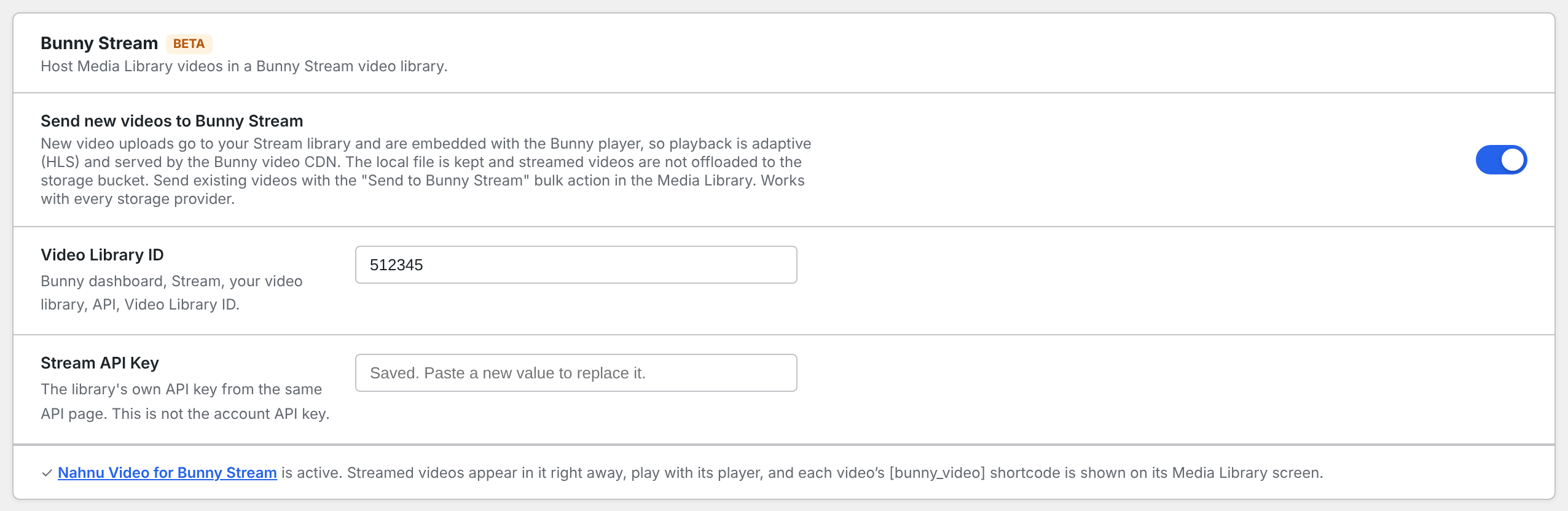
- Go to Media Cloud > Settings and find Bunny Stream.
- Enter the Video Library ID and Stream API Key.
- Switch on Send new videos to Bunny Stream and save.
The ID and key can also be set in wp-config.php with WPMC_STREAM_LIBRARY_ID and WPMC_STREAM_API_KEY.
How videos are sent#
- New uploads go to Stream automatically, in the background, so uploading a large video never holds up the Media Library.
- Existing videos: in Media > Library (list view), select them, choose Send to Bunny Stream from Bulk actions and click Apply.
- An upload that is interrupted continues into the same Stream video instead of creating a second one.
- If an upload to Stream fails, the video is offloaded to your bucket like any other file. You can retry Stream later with the bulk action.
The local file is kept, and streamed videos are not copied to your storage bucket.
Where the Bunny player is used#
Video blocks and shortcodes for a streamed video render the Bunny player automatically. Videos that are not on Stream play as before.
To place videos anywhere else, with shortcodes, blocks, grids and playlists, install the free Nahnu Video for Bunny Stream plugin. Every video sent from WP Media Cloud appears in it.
Deleting videos#
With Delete from cloud when deleted in WP on, deleting a video in the Media Library also deletes it from Stream.
Turning Stream off#
Switch off Send new videos to Bunny Stream. Videos already on Stream keep playing from Stream; new uploads are offloaded to your bucket as usual.
Troubleshooting#
- Upload fails with an authentication error: the key is your account API key. Use the API key from the library’s own API page.
- “Videos over 100 MB need the PHP cURL extension”: ask your host to enable PHP cURL.
- New videos are not sent: uploads run through WP-Cron. Check the Health tab for WP-Cron and loopback warnings.