
Recover records from the bucket
WP Media Cloud keeps a record of every file it offloads. If those records are lost while the files are still in your bucket, the plugin treats the media as not offloaded. Recover Records from Bucket finds the files in your bucket and rebuilds the records, without uploading anything again.
When you need it#
- You restored a database backup from before the offload.
- You moved the site and the WP Media Cloud table did not come along.
- An earlier Reset All Settings (before 1.2.0) also cleared the records. Since 1.2.0 a reset keeps them unless you tick the separate option to clear them.
- You copied files into the bucket yourself, matching the uploads folder structure.
How it finds files#
For each attachment without a record, it looks for the file in the bucket you use now, in three places:
- under your path prefix, for example
media/2024/05/photo.jpg - at the bucket root,
2024/05/photo.jpg - under
wp-content/uploads/, which other offload plugins use
It records every image size it finds. Nothing is uploaded or deleted, and records that already exist are never changed.
Recovering records#

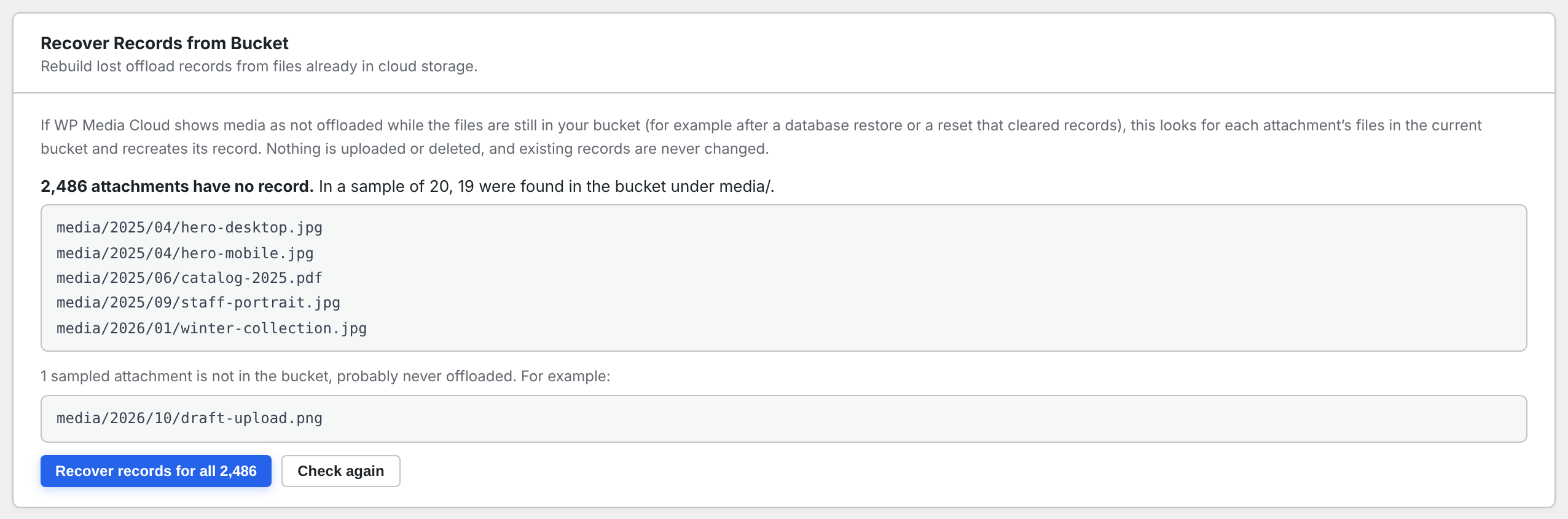
- Go to Media Cloud > Settings and scroll to Recover Records from Bucket.
- Click Check a sample. A handful of attachments are checked, and the result shows where their files were found.
- If the files were found, click Recover records for all N.
- Keep the tab open until it finishes. Media then loads from the cloud again.
From the command line#
wp wpmc rebuild-records --dry-run
wp wpmc rebuild-records
On multisite, add --network or --sites=2,5.
Multisite with a shared bucket#
If several sites share one bucket without a path prefix, a file could belong to any of them, so recovery refuses to run and says so. Give each site its own prefix, such as sites/%site_id%. See Custom path prefix.
Thanks#
This feature is based on a tool contributed by Matt. Thank you, Matt.