
Font pluginsNew
Font plugins host fonts on your site and write a stylesheet with an @font-face rule for each font. WP Media Cloud works with them so their fonts always load from where they are served. Where that is follows Serve fonts from your site, which is on by default: fonts load from your site, never from the CDN.
Three font plugins are supported: Jooosi Fon, Nahnu Fonts and Fonts Plugin (free and Pro). The Integrations tab lists them under Fonts, with their status.
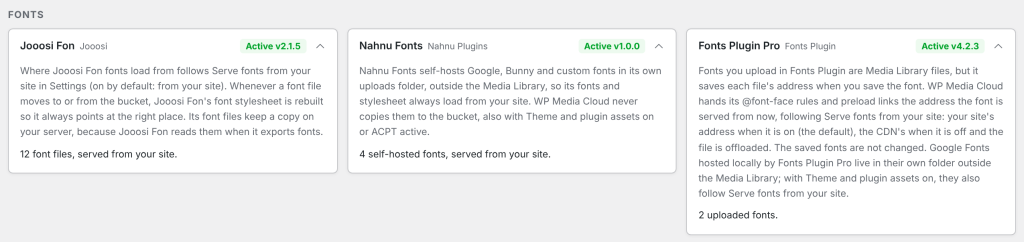
Jooosi Fon#
Jooosi Fon (formerly Yabe Webfont) saves each font file in the Media Library, in the jooosi-fon/fonts folder of your uploads, and writes one stylesheet, jooosi-fon/cache/fonts.css, with the address of every font.
With Serve fonts from your site on (the default):
- Font files you add or import in Jooosi Fon are never offloaded.
- Font files offloaded before are brought back to your server automatically, and the stylesheet is rebuilt with your site’s addresses. See Fonts already on the CDN.
With it off, font files are offloaded like other media, and Jooosi Fon’s stylesheet is rebuilt each time one moves, so it points at the CDN.
Either way:
- Jooosi Fon’s stylesheet and preload links are rebuilt whenever a font file is offloaded or brought back, and when you save WP Media Cloud’s settings, so they never point at a place the font is not served from.
- Its stylesheet is never copied by Theme and plugin assets.
- Its font files keep their copy on your server, because Jooosi Fon reads them when it exports fonts with bundled files. Remove local files and Remove Local Copies skip them.
- On sites with ACPT, Jooosi Fon always gets your site’s uploads address, never the CDN’s (see ACPT below).
Check that it works#
- Open a page that uses one of your Jooosi Fon fonts and view its source.
- Open Jooosi Fon’s stylesheet (
jooosi-fon/cache/fonts.css), or look for@font-facein the page if Jooosi Fon prints its CSS inline. - Each
src: url(...)should start with your site’s address (or your CDN’s, with Serve fonts from your site off).
The Integrations tab shows how many Jooosi Fon font files there are and whether any are still coming back from the bucket.
Nahnu Fonts#
Nahnu Fonts is our own font plugin from Nahnu Plugins. When it isn’t installed, its card on the Integrations tab links to nahnufonts.com.
Nahnu Fonts self-hosts Google, Bunny and custom fonts in its own folder, uploads/nahnu-fonts, outside the Media Library. WP Media Cloud never offloads those files, so its fonts and stylesheet always load from your site, whatever Serve fonts from your site is set to:
- Its stylesheet and fonts are never copied by Theme and plugin assets.
- On sites with ACPT, Nahnu Fonts always gets your site’s uploads address, never the CDN’s.
The Integrations tab shows how many self-hosted fonts Nahnu Fonts has. Adobe Fonts load from Adobe and are not counted.
Fonts Plugin and Fonts Plugin Pro#
Fonts Plugin (Olympus Google Fonts) lets you upload your own fonts under Fonts Plugin > Upload Fonts. Each uploaded font file is a Media Library file. When you save a font, Fonts Plugin stores the full address of each file (WOFF, WOFF2, TTF, OTF) and reuses it in its @font-face rules and, in Pro, its preload links.
A saved address never changes on its own: a font saved while its file was on the CDN kept loading from the CDN, and one saved before offloading kept your site’s address. From 1.2.5, WP Media Cloud hands Fonts Plugin the address each file is served from now:
- With Serve fonts from your site on (the default): a CDN address becomes the file’s address on your site, when the file is on your server.
- With it off: your site’s address becomes the CDN address, when the file is offloaded.
The saved fonts are not changed: the Upload Fonts screen still shows the addresses you saved.
Fonts Plugin Pro can also host Google Fonts locally. It keeps them in wp-content/fontsplugin, outside the Media Library, so WP Media Cloud never offloads them. With Theme and plugin assets on, the stylesheet that loads them follows Serve fonts from your site like any other theme or plugin stylesheet.
The Integrations tab shows Fonts Plugin Pro when Pro is active, and how many fonts you uploaded.
Sites with ACPT#
To serve ACPT media from the CDN, WP Media Cloud gives wp_upload_dir() the CDN address on the front end. Font plugins build their stylesheet and font addresses from that same function, which pointed them at the CDN for files the bucket does not have. Jooosi Fon and Nahnu Fonts always get your site’s uploads address (from 1.2.3). ACPT itself still gets the CDN address.
Troubleshooting#
| Problem | Fix |
|---|---|
| A font plugin’s stylesheet still has CDN addresses | Open any admin page so offloaded fonts come back, or save WP Media Cloud’s settings once. Then clear your page cache. |
| A font shows Font file could not be brought back in the Media Library | Its file is on neither your server nor the bucket. Upload the font again in the font plugin. |
| Fonts load from the CDN but the page shows a fallback font | Serve fonts from your site is off and the CDN sends no CORS header. Turn the setting back on, or run the Web Fonts (CORS) check on the Health tab and follow it. |
| A page cache serves the old stylesheet | Purge the page cache. Jooosi Fon purges common page caches after each rebuild. |